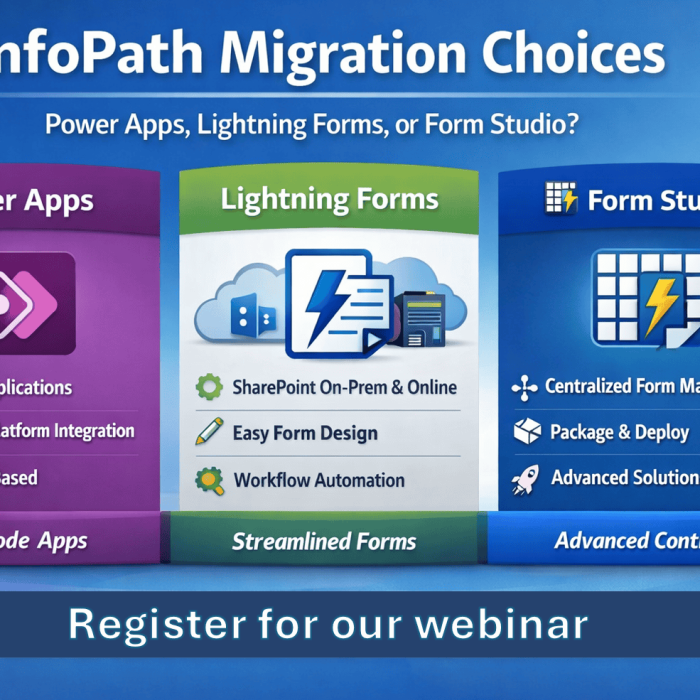
Many organisations still using InfoPath forms are now facing the same challenge: what is the right replacement?
For some, Power Apps is the obvious destination. For others, staying closer to SharePoint with Lightning Forms is the more practical choice. And for some organisations, especially those with more advanced requirements, Lightning Tools Form Studio offers a more powerful route with centralised design, packaging, and deployment capabilities.
The mistake is assuming every InfoPath migration should follow the same path.
Some businesses want rich app-style experiences in Microsoft 365. Some want to modernise SharePoint forms quickly without overcomplicating things. Some need to remain on-premises. Some also need to replace not just forms, but the workflow logic behind them, including SharePoint Designer workflows.
That is why choosing between InfoPath migration to Power Apps, Lightning Forms, or Lightning Tools Form Studio should be based on business reality, not generic advice.
When Power Apps makes sense
Power Apps can be a strong destination for organisations looking to build broader business applications and invest further in the Microsoft Power Platform.
It is often the right fit when you need:
- highly customised app-like user experiences
- deeper use of the Microsoft Power Platform
- more advanced integrations across Microsoft 365
- a strategic move toward low-code application development

For organisations fully committed to Microsoft 365 cloud services, migrating InfoPath forms to Power Apps can be a sensible option.
But it is not always the best fit for every form. If the goal is to modernise SharePoint forms efficiently, Power Apps can introduce more build effort and complexity than some teams actually need.
When Lightning Forms makes sense
Lightning Forms is often the stronger option for organisations that want to modernise SharePoint forms while staying close to the SharePoint experience.
It is a good fit when you want:
- modern SharePoint forms without a full app rebuild
- a lower-code and faster migration path
- a familiar user experience for SharePoint users
- easier maintenance for business forms
- support for on-premises SharePoint environments as well as cloud scenarios

That on-premises point matters.
Not every organisation is ready to move everything to the cloud, and not every organisation can use Power Apps as their preferred destination. Some businesses still need solutions that work within their existing SharePoint on-premises environment. Lightning Forms gives those organisations a viable and modern route forward, without forcing a cloud-only decision.
When Lightning Tools Form Studio is the more powerful choice
For organisations looking beyond individual form replacement, Lightning Tools Form Studio offers a more advanced approach.
Form Studio is the stronger option when you need:
- centralised form design
- more control over building and managing solutions
- the ability to package and deploy forms and related assets
- a scalable approach across multiple sites or environments
- a more strategic forms and process platform rather than one-off form replacement
This makes it especially valuable for organisations that want to standardise their approach to forms, solution deployment, and governance rather than simply migrating one form at a time.
Replacing the form is only half the story
A lot of InfoPath forms were never just forms.
They were part of a wider business process, often supported by SharePoint Designer workflows. That is where many migration projects get caught out. Teams replace the front-end form but forget the logic and automation behind it.
That creates gaps.
This is why a realistic migration strategy needs to consider not only the destination for the form, but also how to recreate the workflow and business process around it.
Recreating SharePoint Designer workflows with Lightning Tools Actions
For organisations moving away from InfoPath and SharePoint Designer workflows, Lightning Tools Actions adds another important part of the picture.
Lightning Tools Actions provides workflow and automation capabilities that can be used to recreate many SharePoint Designer Workflow scenarios far more easily. That means organisations are not just replacing a form design; they can also rebuild the process logic that made the form useful in the first place.
This is critical because an InfoPath migration often fails when the form is treated in isolation.

A better migration approach looks at:
- the form itself
- the logic behind the form
- approvals and process steps
- notifications and task handling
- the data and structure already in use
With the right tools, organisations can move away from legacy InfoPath solutions without losing the working process behind them.
Why preserving logic and data matters
A successful InfoPath migration is not just about reproducing the layout of a form.
It is about preserving the real value behind it:
- form structure
- business rules
- conditional behaviour
- workflow logic
- field mappings
- historical data

If those things are ignored, the result is not really migration. It is a manual rebuild project with all the cost, delay, and risk that comes with it.
That is why the migration tool matters just as much as the destination platform.
There is no one-size-fits-all InfoPath replacement
This is the real point.
Choose Power Apps when you want broader low-code application capability in Microsoft 365.
Choose Lightning Forms when you want a practical, SharePoint-focused route that can also support on-premises environments.
Choose Lightning Tools Form Studio when you need a more powerful, centralised approach to form design, packaging, and deployment.
And when workflow replacement is part of the challenge, Lightning Tools Actions helps recreate the automation and business logic that many InfoPath solutions depended on.
The right answer depends on the organisation, the environment, and the complexity of the solution being replaced.
See it live in this week’s webinar
If you are currently evaluating your next step beyond InfoPath, join this week’s Lightning Tools Form Migrator Webinar.
In the webinar, I’ll be demonstrating migration to Power Apps and Lightning Forms, while also showing the wider migration picture around workflow replacement and more advanced options such as Lightning Tools Form Studio.
Register for this week’s webinar to see Lightning Tools Form Migrator in action and explore the right migration path for your organisation.