
SharePoint discussion board for structured, searchable communities
Turn everyday conversations into lasting organisational knowledge with forum groups, threaded discussions, trusted answers, moderation and engagement analytics—all inside Microsoft 365.
Create communities where useful answers stay easy to find
Social Squared gives employees a clear place to ask questions, share expertise and build on one another’s ideas. Unlike fast-moving chat, discussions remain organised, searchable and valuable long after the original conversation.
Organise discussions
Structure conversations into forum groups, forums and topics for departments, projects, professional communities or organisation-wide initiatives.
Capture trusted answers
Use threaded replies, voting, ratings and answered questions to surface useful knowledge and reduce repeated requests.
Build engaged communities
Encourage participation with subscriptions, polls, rich content, notifications and familiar social features.

Build communities around the topics that matter
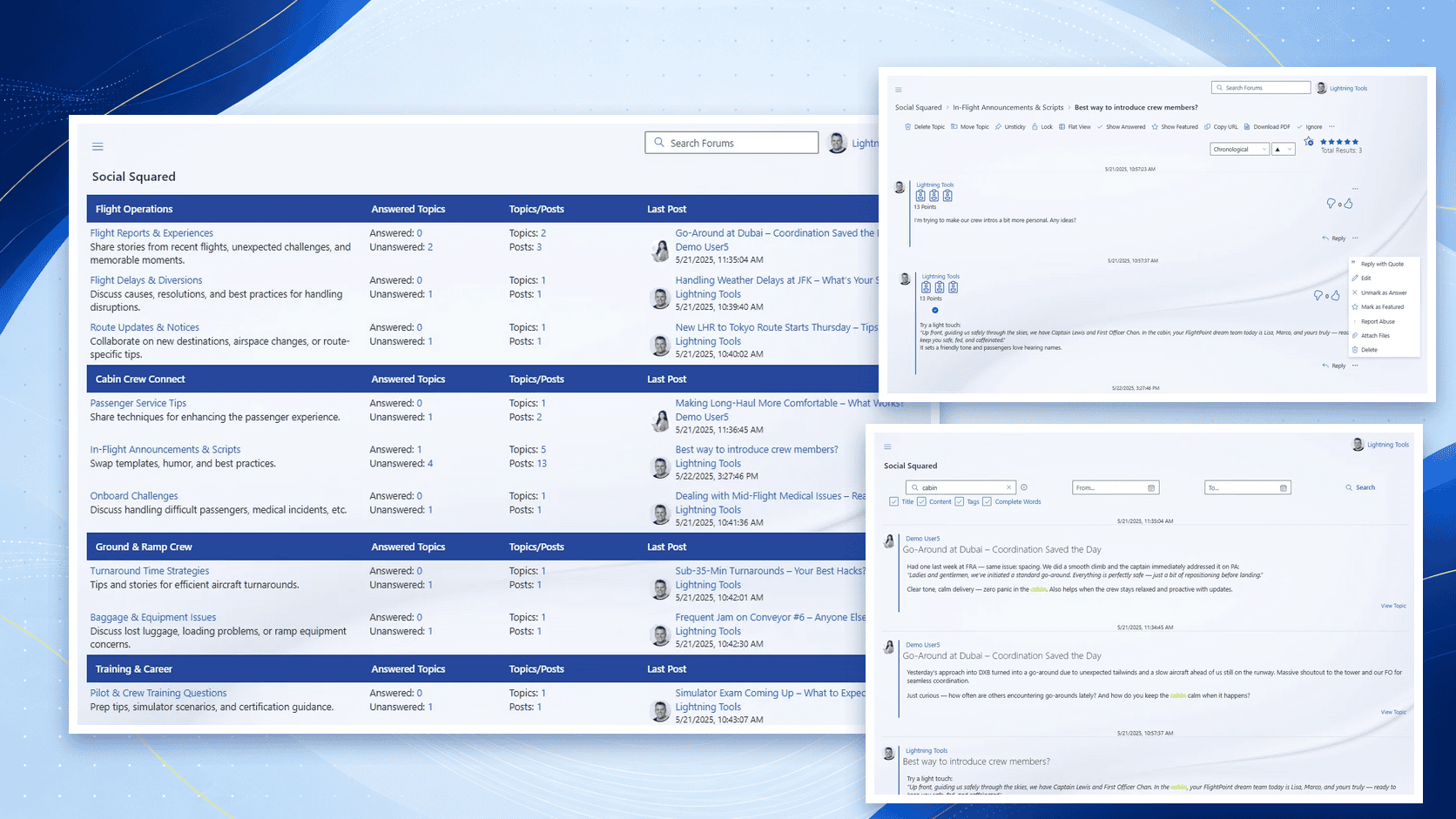
Give every audience a purposeful space. Users can navigate directly to the right community, understand its purpose and see where new activity is happening.
- Create separate communities for different audiences and subjects
- Organise related forums into clearly defined forum groups
- Display answered and unanswered topic counts
- Surface recent discussions and the latest contributions
- Share forum content across different SharePoint sites
- Provide the same structured experience through Microsoft Teams
Launch a useful community without starting from scratch
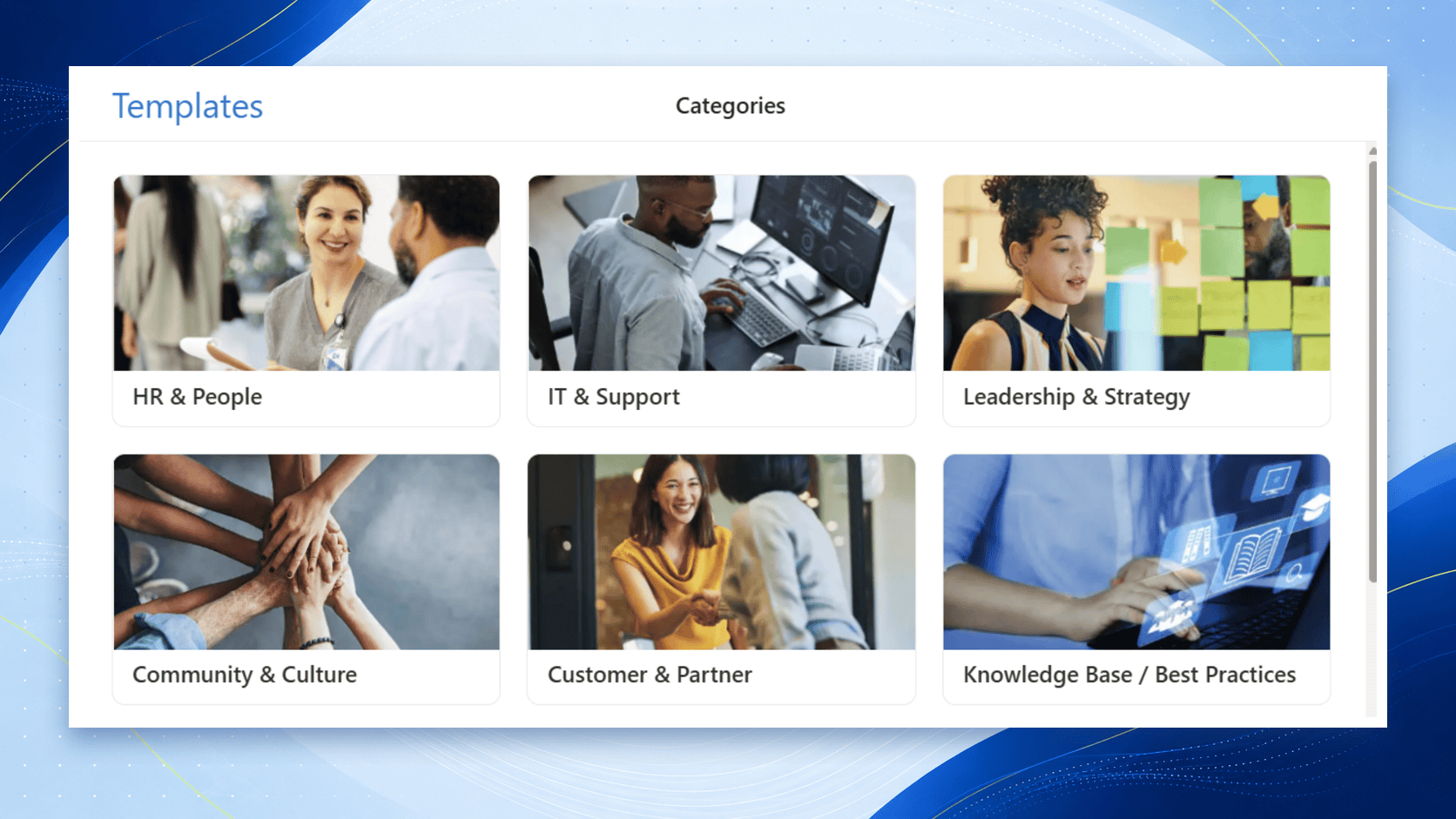
Ready-made templates provide practical starting points for common organisational communities. Choose a scenario, then adapt the forum names, descriptions and structure to suit your audiences and objectives.
- Support employees through HR and People communities
- Create structured IT help and support forums
- Encourage leadership discussions and strategic ideas
- Strengthen employee engagement and workplace culture
- Connect customers, partners and internal experts
- Build searchable knowledge bases and communities of practice
Create conversations people want to join
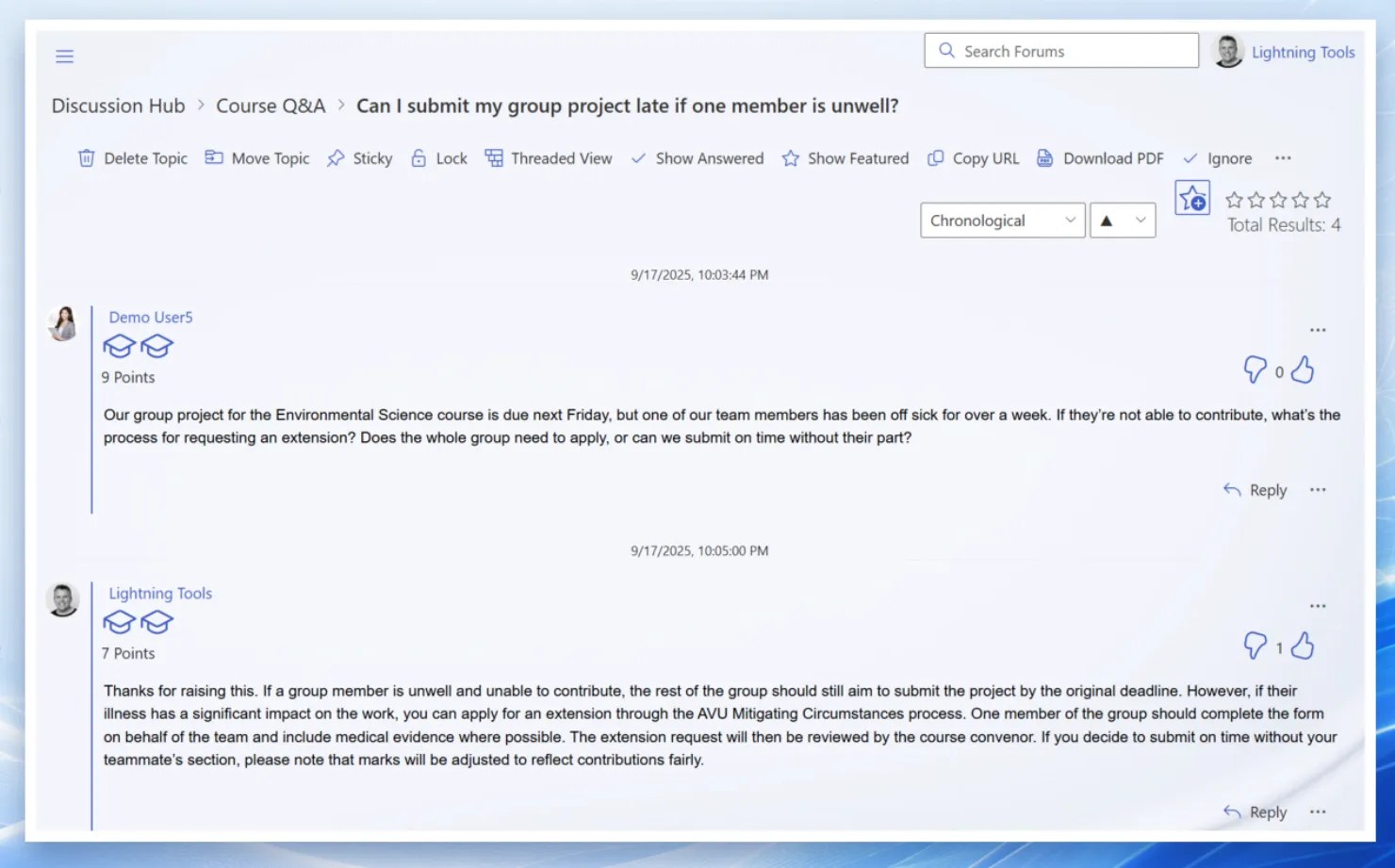
Give people a dedicated place to ask questions, share experience and build on one another’s ideas without losing the context of the original discussion.
- Create topics with rich text, images, videos and attachments
- Organise replies using threaded or chronological views
- Reply directly or quote another contribution
- Encourage participation with polls and anonymous posting
- Highlight valuable contributions with voting, ratings and answered topics
- Subscribe to forums and topics for activity notifications
See what is working—and where engagement needs help
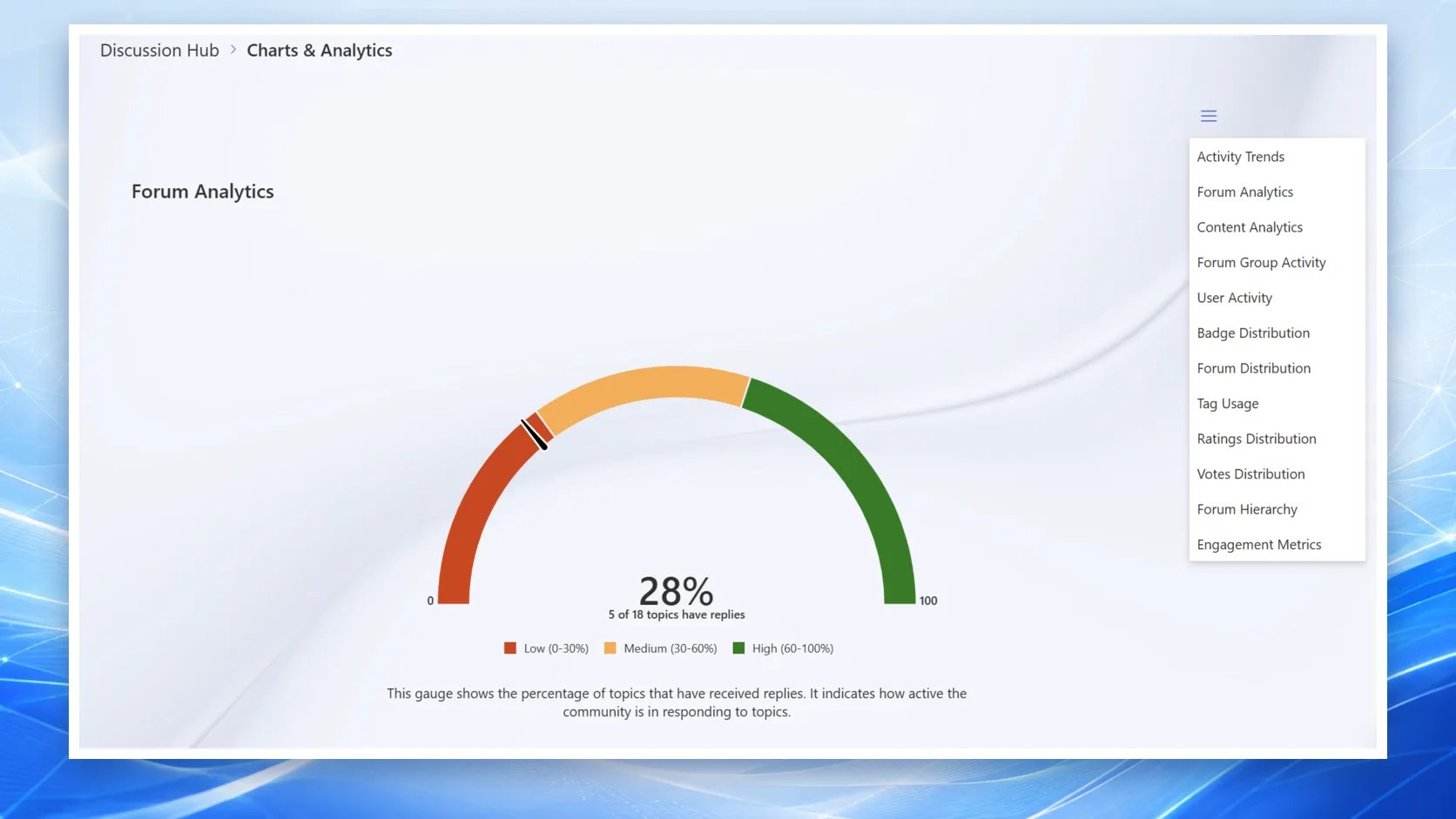
Track participation across forums, understand which content generates engagement and identify communities where questions are going unanswered.
- Follow activity and engagement trends over time
- Measure reply rates and identify unanswered topics
- Compare participation across forums and forum groups
- Recognise active contributors
- Analyse votes, ratings, badges and popular tags
- Review forum structure as the community grows
Keep every community useful and on track
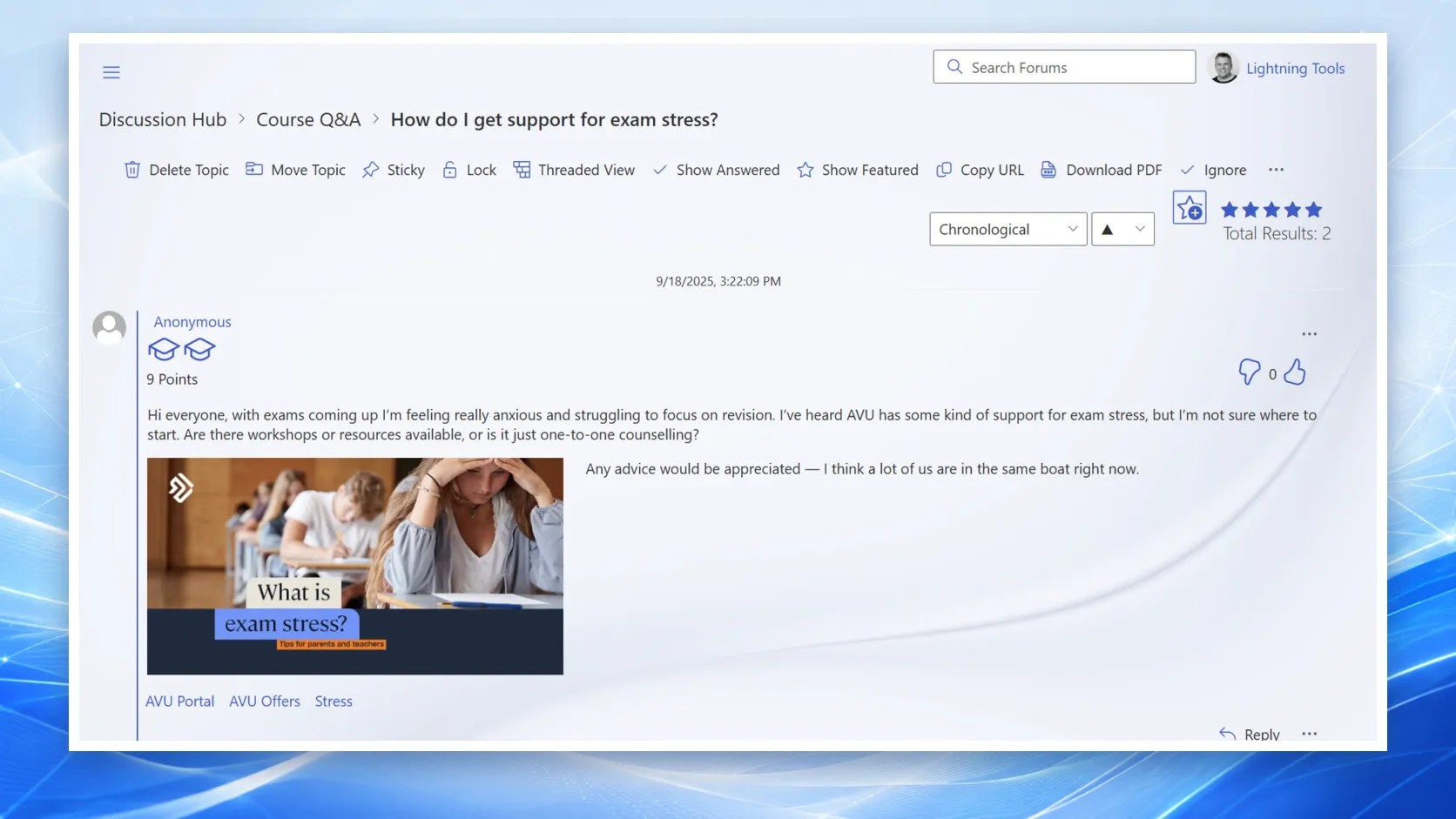
Moderators get clear, in-context controls for maintaining the quality and relevance of discussions without making people hesitant to participate.
- Move misplaced topics to the appropriate forum
- Make important or timely discussions sticky
- Lock completed topics when further replies are unnecessary
- Mark questions as answered and feature valuable contributions
- Remove inappropriate, duplicated or outdated topics
- Manage discussions directly within each topic
Help people understand discussions and respond faster
Social Squared brings Copilot assistance into structured communities so employees can get up to speed quickly and contribute more confidently.
Summarise topics
Turn long discussions into concise summaries that help readers understand the key points before joining in.
Suggest useful answers
Give contributors a helpful starting point based on the discussion context while keeping people in control of the final response.
Preserve the outcome
Keep the final discussion, trusted replies and accepted answers inside the community as reusable organisational knowledge.
Keep community data inside your SharePoint environment
Social Squared is a SharePoint Framework web part. Discussion content is stored in SharePoint lists and protected by your existing Microsoft 365 authentication, permissions and governance.
- Deploy as an SPFx web part in SharePoint Online
- Store forum data in SharePoint lists within your tenant
- Use existing SharePoint permissions and Microsoft 365 authentication
- Add Social Squared as a Microsoft Teams tab
- Display forums across multiple SharePoint sites
- Surface activity through Adaptive Cards and Viva Connections
Structured where chat is transient
Microsoft Teams chat is ideal for fast conversation. Social Squared complements it with persistent forums, clear categories, moderation and searchable answers for knowledge that needs to remain useful.
See Social Squared in action
Explore demonstrations and practical guidance for building structured knowledge communities in SharePoint and Microsoft Teams.
Social Squared 5.1
Watch the on-demand session covering smarter SharePoint discussions with Copilot.
More demonstrations
Browse live and on-demand Lightning Tools webinars for product walkthroughs and practical guidance.
Talk through your use case
Book a free consultation and we will recommend the approach that best fits your organisation.
Social Squared questions, answered
Key information about deployment, storage, Teams support, moderation and analytics.
Where is the discussion data stored?
All forum data resides in SharePoint lists within your SharePoint site. Content is protected by your existing SharePoint permissions, and authentication is handled through Microsoft 365.
How is Social Squared built?
Social Squared is developed as a SharePoint Framework (SPFx) web part, providing a native experience in SharePoint Online and Microsoft Teams without an external discussion database.
Can I display forums across multiple SharePoint sites?
Yes. The Alternate Content Source option lets you display forums and their content across more than one SharePoint site, so different teams can collaborate in a shared discussion space.
Does Social Squared support reporting and analytics?
Yes. Built-in reporting helps you understand activity, participation and unanswered topics. You can also connect the underlying SharePoint list data to Power BI or use the Lightning Tools Data Viewer web part.
Can I use Social Squared in Microsoft Teams?
Yes. Add Social Squared as a Teams tab so users can browse forums, create topics and reply without leaving Microsoft Teams.
Does Social Squared work with Adaptive Cards?
Yes. Forum activity can be surfaced through Adaptive Cards, including in experiences such as the Viva Connections Dashboard.
Is Social Squared mobile-friendly?
Yes. Social Squared is responsive across desktop, tablet and mobile devices.
How is Social Squared different from Viva Engage?
Viva Engage is designed for broad social networking-style conversations. Social Squared provides structured forum groups, categories, threaded replies, trusted answers and detailed moderation for organised knowledge communities.
Can I moderate and control forum content?
Yes. Moderators can approve posts, move topics, lock or remove threads, mark answers and make important discussions sticky.
Ready to turn conversations into shared knowledge?
Start a free trial, book a live demonstration or compare the current licensing options for your organisation.