
SharePoint permissions management for secure Microsoft 365 access
DeliverPoint is a SharePoint Framework app from Lightning Tools that reports, reviews and remediates permissions, sharing links and external access across SharePoint Online, Microsoft Teams and OneDrive. Administrators and Site Owners use it to find oversharing, remove access in bulk and prepare content for Microsoft 365 Copilot. Annual pricing starts with a $2,900 USD base fee plus $2.90 per Microsoft 365 user.
Last updated:
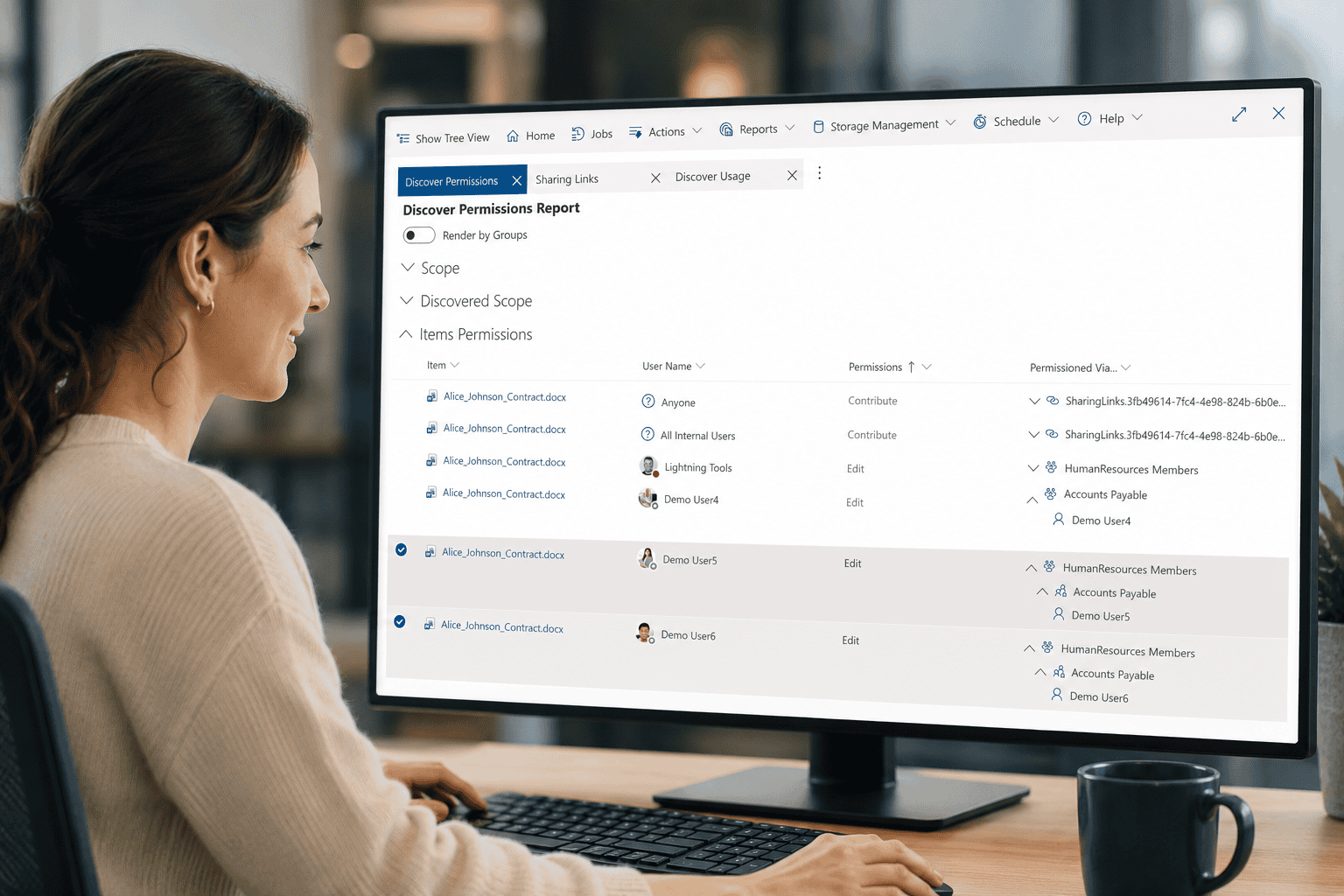
How do you find who has access to SharePoint content?
DeliverPoint gives administrators and Site Owners one clear view of direct permissions, group membership, sharing links and external access. Move from fragmented checks to a repeatable permissions-management process built for Microsoft 365.
Discover access
See who can access sites, Teams, OneDrive content, folders and documents—including how that access was granted.
Review risk
Identify broad access, external users, anonymous links, ownerless sites and exceptions that need attention.
Remediate at scale
Grant, revoke, copy, transfer or remove access across multiple locations without editing every site individually.

See exactly who has access—and why
Turn complex SharePoint permissions into actionable reports for administrators, auditors and Site Owners.
- Report permissions across sites, Teams, OneDrive, libraries, folders and files
- Trace access through SharePoint groups, Microsoft 365 groups and direct grants
- Filter by users, groups, permission levels, sites or content
- Find external users, unique permissions and overexposed content
- Export results for evidence, investigation and governance reviews
- Give Site Owners relevant insight without granting tenant-wide administration
How do you remove SharePoint sharing links and permissions in bulk?
Move from finding a problem to fixing it. DeliverPoint helps teams reduce oversharing without disrupting legitimate collaboration.
- Report anonymous, company-wide, specific-people and direct sharing links
- Remove or expire sharing links in bulk
- Grant or revoke permissions across multiple sites and items
- Copy or transfer permissions when responsibilities change
- Remove departed users and obsolete access consistently
- Record administrative changes for accountability


How do you run recurring SharePoint access reviews?
Microsoft also describes a governance approach in getting ready for Copilot with SharePoint Advanced Management.
Schedule reports and put the right information in front of the people who own the risk, rather than relying on occasional manual checks.
- Run reports on a recurring schedule
- Track external access and sharing links over time
- Support access reviews with evidence Site Owners can understand
- Identify sites without accountable owners
- Deliver focused reports to the relevant stakeholders
- Build a consistent governance rhythm across Microsoft 365
How do sensitivity labels fit into SharePoint permissions management?
Report on sensitivity labels alongside access information so teams can prioritise review and apply the right protection to important content.
- See sensitivity labels across SharePoint and Microsoft 365
- Find labelled and unlabelled content that needs attention
- Compare protection with current access and sharing
- Assign or update sensitivity labels in bulk where appropriate
- Prioritise high-value content during access reviews
- Support governance and Copilot-readiness programmes


Can you audit SharePoint permission changes?
Understand how access has changed and provide defensible evidence for internal reviews, investigations and compliance activity.
- Review the history of permission-related activity
- See who made a change and when it happened
- Track grants, revocations and sharing-link actions
- Investigate unexpected access efficiently
- Export results for audit and governance teams
- Demonstrate that remediation has been completed
Give every stakeholder the right level of control
DeliverPoint helps central administrators set standards while enabling Site Owners to review and maintain access in the places they understand best.
Empower Site Owners
Provide focused permission reports, access reviews and remediation tools through SharePoint without giving owners unnecessary administrative rights.
How do you prepare SharePoint permissions for Microsoft 365 Copilot?
Find overshared content and reduce access risk before Microsoft 365 Copilot makes existing information easier to discover.
Copilot respects existing access permissions. See Microsoft’s guidance on Copilot security and oversharing and Copilot data privacy and permissions.
Manage storage too
Add DeliverPoint Storage to report on versions, duplicate content and storage consumption, then remove unnecessary versions at scale.
Where is DeliverPoint deployed and where does data live?
DeliverPoint is deployed as a SharePoint Framework application in your Microsoft 365 tenant. It works with SharePoint, Teams and OneDrive while using Microsoft 365 authentication and permissions.
- No shared Lightning Tools database containing your Microsoft 365 content
- Use your existing Microsoft 365 identities and security model
- Keep scheduled-reporting resources in your customer-controlled Azure subscription and region
- Provide administrators and Site Owners with purpose-built experiences
- Apply governance without moving content out of Microsoft 365
Talk through your governance goals
Book a free consultation to discuss reporting scope, access reviews, remediation and a practical rollout for your organisation.
Trusted for clearer permissions management
“The Lightning Tools DeliverPoint tool is a great and valid helper for us.”
Miroslav Pomsar · 9/10 · Read DeliverPoint reviews on TrustRadius
Build a stronger SharePoint permissions strategy
Explore practical guidance, comparisons and customer examples for improving Microsoft 365 access governance.
SharePoint permissions guide
Understand the building blocks behind SharePoint Online access and permission inheritance.
Access reviews for Site Owners
See why effective reviews need more context and action than the standard Manage Access panel provides.
DeliverPoint in practice
Learn how an automotive organisation approached permissions visibility and governance.
DeliverPoint questions, answered
Key information about permissions reporting, remediation, deployment, scheduling and licensing.
What is DeliverPoint?
DeliverPoint is a SharePoint permissions management tool for reporting, reviewing and remediating access across SharePoint Online, Microsoft Teams and OneDrive.
What permissions can DeliverPoint report?
It reports direct permissions, SharePoint group membership, Microsoft 365 group access, permission levels, unique permissions, external users and sharing links across sites and content.
Can DeliverPoint remove or change permissions in bulk?
Yes. Authorised users can grant, revoke, delete, copy or transfer permissions across multiple locations, as well as remove or expire sharing links in bulk.
Does DeliverPoint support Microsoft Teams and OneDrive?
Yes. DeliverPoint reports and manages access associated with SharePoint Online, Teams-connected sites and OneDrive content.
Can Site Owners use DeliverPoint?
Yes. DeliverPoint can give Site Owners focused reporting, review and remediation capabilities for the sites they manage without granting tenant-wide administrative access.
Can I schedule permissions reports?
Yes. Scheduled reporting helps organisations monitor access regularly and deliver relevant reports to administrators, Site Owners and governance stakeholders.
Does DeliverPoint report sharing links and external access?
Yes. The Sharing Links report shows link type, scope and access details so you can identify anonymous, organisation-wide and external sharing and take action.
Can DeliverPoint help with Microsoft 365 Copilot readiness?
Yes. By identifying overshared content, broad access and risky sharing links, DeliverPoint helps reduce the chance that Copilot surfaces information to people who should not have access.
Where is DeliverPoint deployed?
The user experience is deployed as a SharePoint Framework application in your Microsoft 365 tenant. Scheduled reporting can use resources deployed in your own Azure subscription and chosen region.
How much does DeliverPoint cost?
Annual pricing starts with a $2,900 USD base fee plus $2.90 per Microsoft 365 user per year. Current options and inclusions are available on the DeliverPoint pricing page.
Ready to take control of SharePoint permissions?
Start a free trial, book a live demonstration or compare the current licensing options for your organisation.