

We’re delighted to announce Social Squared 5.1.0.0, a major new release of our structured discussion board for SharePoint and Microsoft Teams. The headline addition is integration with Microsoft 365 Copilot, helping people understand long discussions faster and create thoughtful responses without losing the context of the original conversation.
Social Squared already helps organisations turn everyday conversations into structured, searchable knowledge. Version 5.1 takes that a step further by bringing Copilot directly into the discussion experience—while Social Squared content continues to be stored within SharePoint in your own Microsoft 365 tenant.
What’s new in Social Squared 5.1?
- Summarise complete discussion topics with Microsoft 365 Copilot
- Save an approved Copilot summary permanently against the thread
- Ask Copilot to suggest a response using the context of the discussion
- Create Forum Groups and forums quickly from ready-made templates
- Add and organise forums through an improved visual editing experience
- Manage Social Squared through a dedicated Admin Page
- Understand community activity with built-in analytics and reporting
Microsoft 365 Copilot comes to Social Squared
Discussion forums are valuable because they capture more than a single answer. They preserve questions, alternative viewpoints, practical experience and follow-up information. However, as a useful thread grows, it can take time for a reader to understand the key points.
With the new Social Squared Copilot integration, users with an eligible Microsoft 365 Copilot licence can bring the value of that full conversation to the surface much more quickly.
Summarise an entire discussion with Copilot
From within a Social Squared topic, you can ask Copilot to produce a clear summary of the discussion. Copilot considers the conversation in context and turns a long thread into a concise overview of the important points, advice and conclusions.
Once the generated summary has been reviewed and accepted, Social Squared can set it permanently against that topic. Future visitors can understand the discussion immediately without asking Copilot to regenerate the same summary each time.
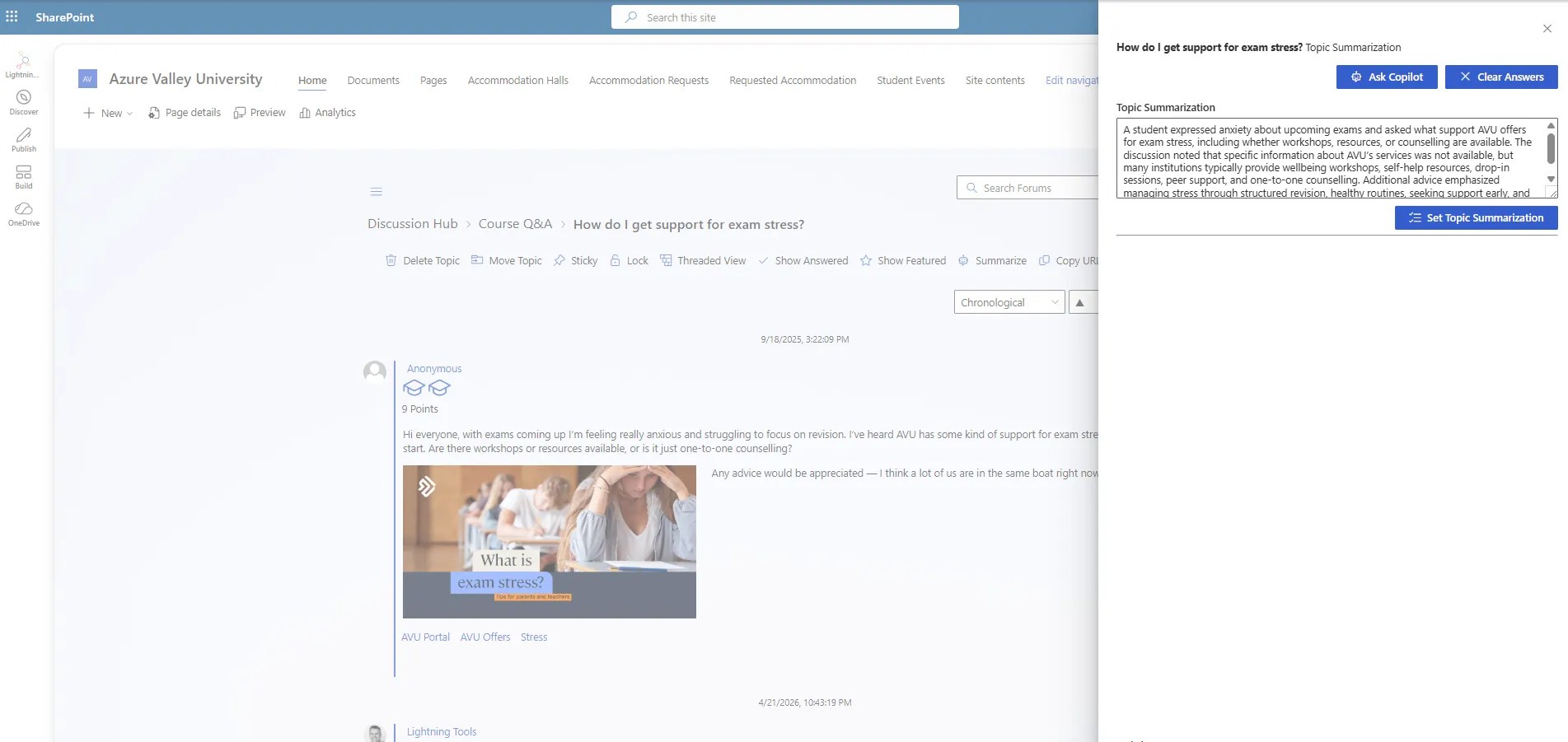
This is particularly useful for busy support forums, employee communities, project discussions and knowledge-sharing spaces where important threads may contain many replies. New readers get the answer faster, while the underlying discussion remains available whenever they need the detail.
Ask Copilot to help create a response
Copilot can also assist while you are replying to a Social Squared discussion. Rather than starting from a blank message, you can ask Copilot to propose a response within the context of the topic.
You remain in control: review the suggested answer, refine it where necessary and then use it as the basis of your reply. This can help subject-matter experts respond more efficiently, give occasional contributors greater confidence and improve the consistency of answers across a community.
The important distinction is context. Copilot is not simply generating generic text; it is being used from within Social Squared to support a response to the conversation currently taking place.
Your Social Squared data remains in your tenant
Social Squared stores forum groups, topics, replies and related discussion content in SharePoint within your Microsoft 365 tenant. The Copilot integration does not require moving your forum data into a separate Lightning Tools AI service. Organisations can add AI assistance to their structured discussions while continuing to work within their existing Microsoft 365 environment.
An eligible Microsoft 365 Copilot licence is required to use the Copilot summarisation and response features.
Launch new SharePoint discussion forums faster with templates
Creating a useful community involves more than adding an empty discussion board to a SharePoint page. The right structure helps people understand where to ask questions, what belongs in each forum and how the community is intended to work.
Social Squared includes templates that can create practical Forum Group and forum structures without making administrators begin from scratch. Example scenarios include:
- HR and People
- IT and Support
- Leadership and Strategy
- Community and Culture
- Customer and Partner communities
- Knowledge bases and best-practice forums
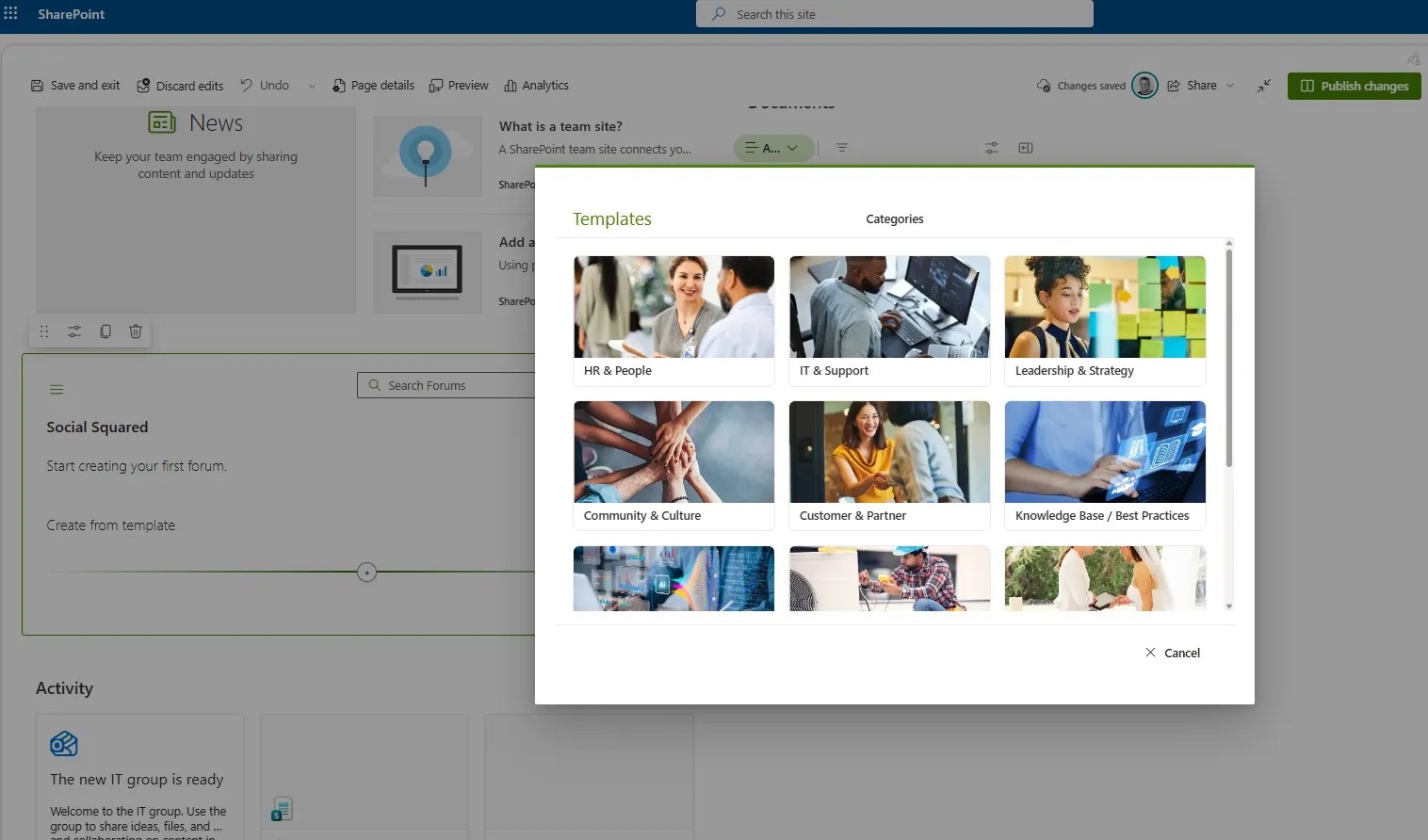
Templates provide a strong starting point rather than a rigid final design. Once created, the Forum Groups, forum names and descriptions can be adapted to match your organisation, audiences and objectives.
A better visual editing experience for Forum Groups and forums
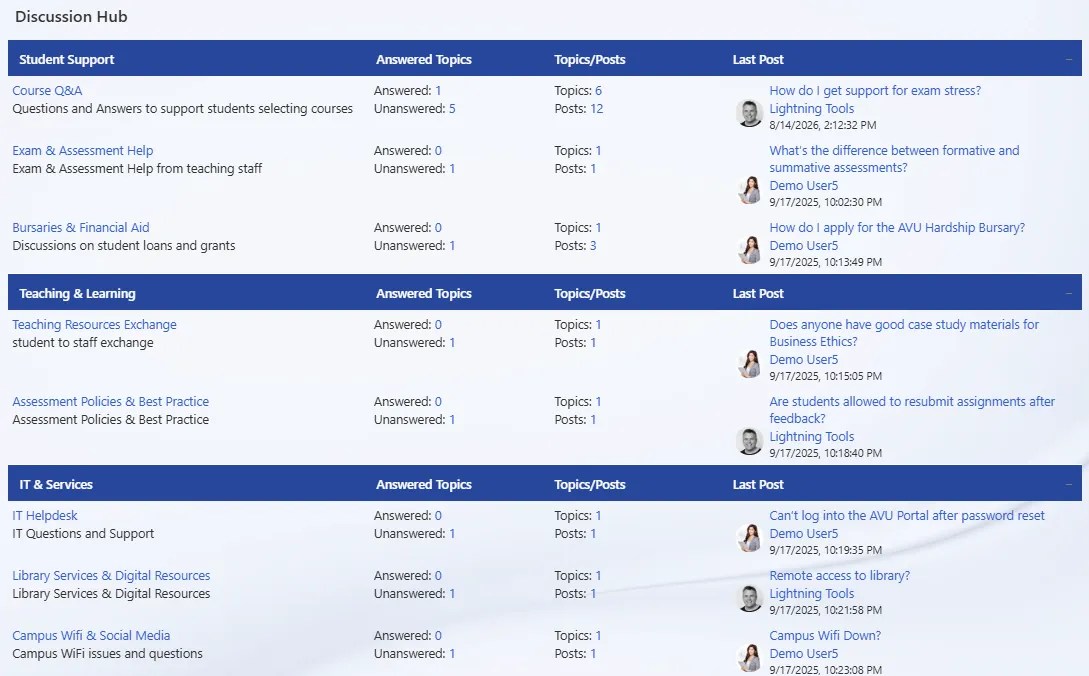
Social Squared also introduces an improved editing experience for administrators who want to build or change a forum structure manually. Forum Groups and individual forums can be added in context, directly within the discussion board layout.

This makes the relationship between the structure you configure and the experience users will see much clearer. It is easier to add a forum in the correct location, expand a community over time and keep the discussion hub aligned with changing business needs.
Administration, analytics and reporting included
Successful communities need visibility as well as engaging content. The current Social Squared experience brings administration and reporting together with the discussion board itself.
The dedicated Admin Page provides a central place for managing Social Squared, while built-in analytics and reporting help community owners understand how forums are being used. You can identify activity patterns, see where discussions are attracting participation and recognise areas where questions may need more attention.
These insights help administrators move beyond simply launching a forum. They can actively improve the structure, encourage participation and demonstrate how community conversations are becoming reusable organisational knowledge.
From conversations to organisational knowledge
Microsoft Teams and chat are excellent for fast-moving communication, but valuable answers can quickly disappear into message history. Social Squared gives those conversations a durable, organised home through Forum Groups, forums, topics, threaded replies, voting, answered questions and moderation.
Social Squared 5.1 adds a useful AI layer to that foundation. Copilot helps readers understand what has already been discussed and helps contributors respond, while the permanent Social Squared topic remains the trusted source of context and knowledge.
See Social Squared 5.1 and Copilot in action
This week’s webinar, Introducing Social Squared with Microsoft 365 Copilot: Turn Conversations into Organisational Knowledge, includes a live demonstration of the new Copilot-powered topic summaries and suggested responses.
Register for the Social Squared webinar. After the live event, the same webinar page will provide access to the on-demand recording.
Want to explore Social Squared for your own SharePoint or Microsoft Teams community?
Frequently asked questions
What is Social Squared 5.1.0.0?
Social Squared 5.1.0.0 is the latest release of Lightning Tools’ structured SharePoint and Microsoft Teams discussion board. It introduces Microsoft 365 Copilot topic summarisation and suggested responses, alongside templates, visual forum editing, administration and analytics capabilities.
What Copilot licence is required?
Users need an eligible Microsoft 365 Copilot licence to use the new Copilot-powered summarisation and suggested-response features.
Where is Social Squared discussion data stored?
Social Squared discussion content is stored in SharePoint lists within your Microsoft 365 tenant and protected by your existing Microsoft 365 authentication and SharePoint permissions.
Can a Copilot discussion summary be saved?
Yes. After a Copilot-generated topic summary has been reviewed, it can be set permanently against the Social Squared thread so future readers can see it without regenerating the summary.
